Master LinkedIn: Ultimate Content Creation Guide (2025)
A start-to-finish guide for building a LinkedIn presence: the profile, the first hundred connections, what to post, and how to keep it up past week three.

· 9 min read · Updated
On this page
- Why LinkedIn Content Creation Matters
- Step 1: Set Up a Strong LinkedIn Profile
- Step 2: Build a Meaningful Network
- Step 3: Define Your Content Goals
- Step 4: Choose Your Content Types
- Step 5: Create Engaging Posts
- Step 6: Stay Consistent with a Posting Routine
- Step 7: Use Depost AI to Speed Up the Workflow
- Step 8: Engage With Your Network Daily
- Step 9: Track What Works and Improve
- Conclusion
- FAQ
Everyone tells you to post on LinkedIn. Almost nobody tells you what to do first, what to write about when you have no audience, or how to keep going through the eight weeks where nothing seems to happen.
This is the version I wish someone had given me: the profile setup that actually matters, how to get your first real readers, and how to build a posting habit that survives a busy month.
Why LinkedIn Content Creation Matters
The honest case for posting is narrower than most people make it. It is not that LinkedIn will change your life. It is that a small number of specific things get easier:
- People who might hire you, buy from you, or work with you already know what you think before the first conversation
- Opportunities find you instead of the other way round
- Your ideas get tested by people in your field, which is worth more than the reach
- You become the obvious person to ask about the thing you keep writing about
That last one is the whole game. You are not building an audience, you are building an association between your name and a subject.
Step 1: Set Up a Strong LinkedIn Profile
Every post you write sends people to your profile. If the profile is vague, the post is wasted.
Fix these, in this order:
- Headline. Not your job title. What you do and who for. “Helping B2B SaaS teams fix their onboarding” beats “Senior Product Manager at Acme” for everyone except your own HR department. The free headline generator drafts a few from your role and audience.
- Profile photo. Recent, well lit, your face large in the frame. This matters more than it should.
- About section. Three to five sentences, written like you talk. What you work on, what you have learned, who you are useful to. If the blank field stalls you, the About generator turns four form fields into a first draft.
- Experience. Impact, not duties. “Rebuilt the checkout, cut abandonment by a fifth” says more than a list of responsibilities.
- Featured section. Pin your two or three best posts. This is the first thing a curious visitor clicks.
- Banner. A clean image with a line about what you do. It is free space that most people leave as the default blue. The LinkedIn banner size guide has the exact dimensions, where your photo covers it, and what survives the mobile crop.
Use the language your industry actually searches for. LinkedIn’s search reads your profile, and so does everyone deciding whether to follow you.
Step 2: Build a Meaningful Network
Your first readers are people who already know you. Start there, then widen.
- Connect with colleagues, former colleagues, classmates, and anyone you have worked with.
- Find twenty people in your field who post regularly and follow them.
- Join the groups and communities where your audience already argues about things.
When you send a request to someone you do not know, say why:
“Hi [Name], your post on [topic] was the first thing I’ve read that matched what we saw. Would like to follow your work.”
Then do the part that actually builds the network: show up in their comments for a few weeks before you ask for anything. Connections are a list. Relationships are a history.
Step 3: Define Your Content Goals
Before you write anything, answer three questions:
- What do I want to be known for?
- Who do I need to reach for that to matter?
- What do I want them to do?
The answers narrow everything else. Someone who wants inbound consulting work writes differently from someone who wants a job at a specific company, and both write differently from someone building a reputation inside their profession.
Pick one thing to be known for, and let it become one of your content pillars. You can widen later, and almost nobody does.
Step 4: Choose Your Content Types
You need a handful of formats you can produce reliably:
- Stories. Something that happened, what it cost, what you learned. The most reliable format on the platform.
- Lists. “Five mistakes I made as a junior developer.” Easy to read, easy to save.
- How-tos. Teach one thing properly. These keep getting found long after they are posted.
- Opinions. A position on something contested in your field. The only format that reliably gets comments.
- Questions. Ask something you actually want answered.
- Carousels. For anything with steps, or a before and after.
Rotate them. A feed made of only one format gets predictable, and predictable gets scrolled past.
Step 5: Create Engaging Posts
A post that works usually has five things:
- A hook. The first two lines are all anyone sees before “see more”. Write them last.
- One idea. Posts that make three arguments make none.
- Formatting for a phone. Short paragraphs, blank lines between them. The post preview shows where the “see more” cut lands before you publish.
- A specific ending. One question, or one thing to do.
- A few hashtags. Two or three relevant ones. Not fifteen.
Here is what that looks like assembled:
3 marketing lessons I learned the hard way.
(Avoid my early career stumbles)

Ready to turn back time?

I'm sharing what I'd tweak in my early marketing days.
These insights could save you time and boost your impact.

1) Writing > Tools
↳ Master the message before the tech.

2) Share Weekly
↳ Consistent learning builds authority.

3) Ask for Feedback
↳ Growth comes from outside perspectives.

What do you wish you knew earlier in your career?
#MarketingTips #CareerGrowth
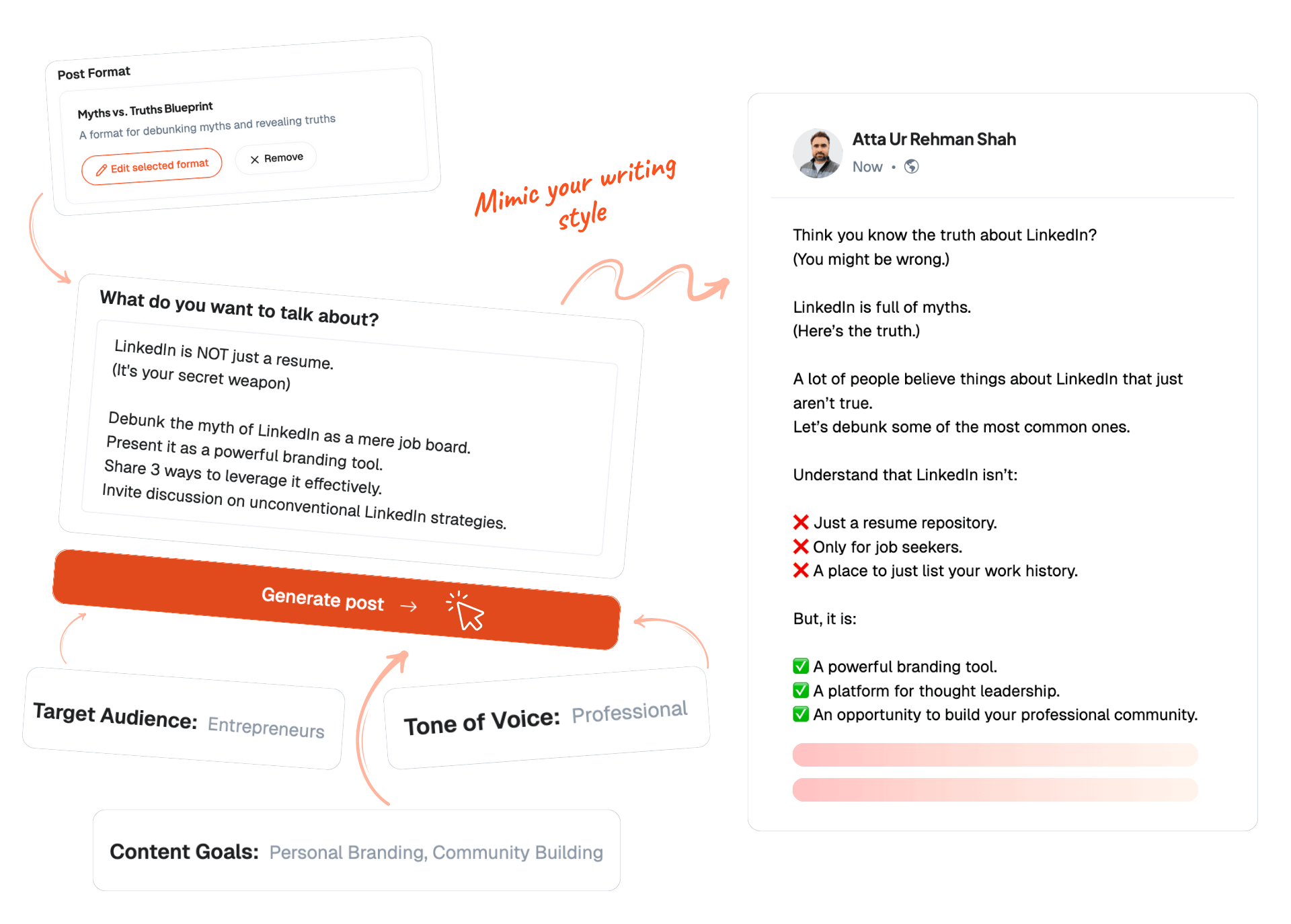
That draft came out of Depost AI.
Native images and documents tend to hold attention longer than plain text, so if the idea has a shape, give it one.
Step 6: Stay Consistent with a Posting Routine
Consistency is the only variable you fully control, and it is where most people fail.
- Two to three posts a week is enough. Daily is a job.
- Weekday mornings are a reasonable default until your own analytics say otherwise.
- Mix formats so you are not writing the same post in different clothes.
- Keep one voice. Readers get used to a register and notice when it changes.
Batch the writing. Sitting down once a week and drafting three posts is far easier than finding something to say every morning, and the quality is usually better because you are not writing under deadline.
Step 7: Use Depost AI to Speed Up the Workflow
The reason people stop is rarely that they ran out of things to say. It is that the loop, deciding, writing, designing, publishing, replying, takes more time than they have on a normal week.
Depost AI runs that loop for you and leaves you the decisions.
- Performance Analyzer syncs your published history and follower growth, and tells you what beat your own average.
- Idea Generator turns those lessons into ranked ideas, so you never start from a blank page.
- Post Generator drafts in your voice, learned from posts you already published, and gets sharper every time you edit one.
- Graphic Generator designs the carousel or infographic to go with the post.
- Scheduling queues approved drafts and publishes them through LinkedIn’s official API, with the first comment written and ready for you to post.
Nothing goes out until you approve it. There is no autopilot, and replies and messages are drafted for you but sent by you.
Step 8: Engage With Your Network Daily
Posting without engaging is half a strategy.
- Comment on three to five posts a day, with something worth reading
- Reply to every comment on your own posts, ideally within the hour
- Follow up with people whose posts you keep finding useful
The hour after you publish matters more than the hour you spent writing. That is when LinkedIn decides how far the post travels, and replies count for more than likes.
Step 9: Track What Works and Improve
Check your numbers monthly, not daily. Daily checking teaches you nothing and feels terrible.
- Impressions, to see reach
- Comments, which are the real engagement signal
- Profile views after a post, which tell you it made someone curious
- Follows, the closest thing to “this changed someone’s mind”
Look for patterns across ten posts, not conclusions from one. A single post going quiet means nothing.
When you do want to judge one post, the free engagement rate calculator puts its rate next to the current platform average, which is more context than the raw counts carry. For what the average actually is this year, and why two rates for the same post can both be right, see what a good LinkedIn engagement rate looks like in 2026.
Conclusion
Nothing here is complicated. A profile that explains you, a few people who read what you write, one thing you want to be known for, and enough consistency to still be posting in three months.
The hard part is the third month, when the novelty is gone and the numbers are still small. Everyone who has an audience now went through it.
FAQ
How often should I post on LinkedIn to grow my network?
Two to three times a week is enough for most people, and it is a pace you can hold. A regular rhythm beats an intense month followed by silence.
What type of content performs best on LinkedIn?
Specific stories from your own work, opinions people can disagree with, and how-tos that teach one thing properly. General advice performs worst, because there is already an infinite supply of it.
How can beginners come up with LinkedIn post ideas?
Write what you explained to someone this week. The question a colleague asked, the mistake you watched someone repeat, the thing you had to look up. Anything you know that took you a year to learn is worth a post.
How do I grow my LinkedIn audience as a student or job seeker?
Post what you are learning while you learn it: projects, things that broke, what you would do differently. It is more interesting than polished retrospectives, and it reaches people who are one step behind you.
What does Depost AI do, and how can it help?
It runs the content loop: reads your analytics, proposes ideas ranked by what has worked for you, drafts posts in your voice, designs the graphics, and schedules through LinkedIn’s official API. You approve every post before it goes live.
Do I need a large following to be successful on LinkedIn?
No. A thousand people in your field who trust you is worth more than fifty thousand who scrolled past. Most of the useful outcomes come from a handful of readers who happened to be the right ones.
How long should my LinkedIn posts be?
Long enough to make the point and no longer. Most good posts land between 150 and 300 words. If you cannot cut a third of your draft without losing anything, it is probably tighter than average.